
This article introduces the Domain-based Message Authentication, Reporting & Conformance or DMARC record to you - a type of DNS record, related to e-mail security, that uses the results of SPF and DKIM checks to apply a certain policy. Furthermore, its reporting capabilities allow for streamlining your e-mail infrastructure.
This article contains the following sections:
- Introduction: the purpose of DMARC
- DMARC records in Openprovider
- DMARC record syntax
- Reporting tools
- Useful documentation
Introduction: the purpose of DMARC
Before understanding DMARC, it is very important to understand the purpose of SPF and DKIM (click the links for full information):
- SPF strictly defines which servers can send e-mail in your name (authentication), but does not validate the contents of the e-mail.
- DKIM allows for digitally signing of (parts of) an e-mail (validation), but does not validate the sender.
DMARC is the technology that combines those two record types, and is the missing link for a 100% trustworthy e-mail validation. DMARC can be configured in such a way that all e-mails that fail SPF and/or DKIM checks is quarantined or blocked by default.
However, DMARC can also be used for reporting if it is configured with a much more relaxed policy - in such a way that e-mail delivery is not affected. This approach is very useful to get insight in your e-mail infrastructure: which servers send e-mail in your name, and are those servers configured correctly? Use that analysis to optimise your e-mail settings. Once done, you may change the policy to improve the quality of your e-mail delivery.
DMARC records in Openprovider
The Openprovider DNS management supports the TXT type for DNS records, that can be used to store DMARC information. The contents of the DMARC record depends on how strict you want the policy to be and your reporting settings.
A DMARC record always is placed on a subdomain which starts with _dmarc:
_dmarc
The DMARC record now is available through _dmarc.yourdomain.com.
DMARC record syntax
Each DMARC record starts with a version number, followed by a policy definition and reporting settings. A simple example is the following DNS record:
"v=DMARC1; p=none; rua=mailto:reporting@yourdomain.com;"
which defines the policy to be none (e-mail delivery is not affected) and asks receiving mailservers to send aggregated reports to reporting@yourdomain.com.
NB! Please put your record between quotation marks every time you specify an DMARC record with any DNS zone configured within Openprovider, and always and a DMARC record with a semicolon (;).
Read on for more details about the syntax.
Version number
Each DMARC record starts with a version number, followed by a space. At this moment, the version number is always the same: v=DMARC1. Be careful with capitalisation: DMARC is all in uppercase!
Policy
Immediately after the version number, the policy is defined in the parameter p. The following values are available:
- p=none: this setting is very useful for reporting. If you set up a DMARC record for the first time on this specific domain, it does not affect e-mail delivery but it allows for sending reports. In other words: whatever the outcome of the SPF and DKIM checks, e-mail is delivered as normal.
- p=quarantine: this policy tells the receiving mail server to place the e-mail in quarantine if either the SPF or the DKIM check fails (or both).
- p=reject: this policy tells the receiving mail server to reject the e-mail if either the SPF or the DKIM check fails (or both). The sender will receive a bounce message. This is the ideal setting, but only if you are completely sure that all your e-mail flows are documented and correctly configured.
It's important to understand that the receiving mail server is not obliged to follow this policy. Some mail servers ignore quarantine or reject policies and just deliver e-mail normally.
Filtering part of the e-mails
If you are not yet 100% confident about your e-mail flows, you can only let a percentage be filtered by using the pct parameter. The rest of the e-mails is treated with a policy that is one level lower. The following example shows a reject policy, but only for 25% of the e-mails. The other 75% of the e-mails are treated with policy quarantine:
"v=DMARC1; p=reject; pct=25;"
Each receiving mail server will randomly select those 25% of the e-mails.
Sub domain policy
The sp parameter defines how the receiving mail server should validate e-mails sent from a sub domain, for example name@sub.domain.com. If you never send e-mail from such domain, set sp=reject. The other values, quarantine and none, are also possible. An example:
"v=DMARC1; p=quarantine; sp=reject;"
Reporting
Receiving mail servers send two types of reports: aggregated reports (parameter rua), normally once every 24 hours, that contain summaries of the filtered e-mails; and forensic reports (parameter ruf) which can be used to investigate flagged e-mails in more detail. The value of both parameters is an e-mail address.
"v=DMARC1; p=quarantine; rua=mailto:reporting@yourdomain.com; ruf=forensics@yourdomain.com;"
DMARC for domains without e-mail
DMARC is useful as well if a domain is not intended to send e-mail. In that case, declare the following DMARC record in your DNS:
"v=DMARC1; p=reject"
Reporting tools
A domain configured according to this last example will generate reports directly to the two @yourdomain.com e-mail addresses. Although they contain a lot of useful information, those reports are not easy to read. There are tools available that process the reports for you.
An example is dmarcian, which we use for a couple of our own domains. Setting up this, or any other, tool is very easy - they will inform you which rua and ruf parameters to configure. For example, a very basic configuration (no policy, only aggregated reports) for openprovider.com would be something like:
"v=DMARC1; p=none; rua=mailto:jfzcxlmo@ag.dmarcian-eu.com;"
jfzcxlmo@ag.dmarcian-eu.com is an e-mail address provided by dmarcian. Analysis of the reports is done by dmarcian and the results are presented visually through a dashboard.
Based on this analysis, you can identify the incorrectly configured servers or SPF records.
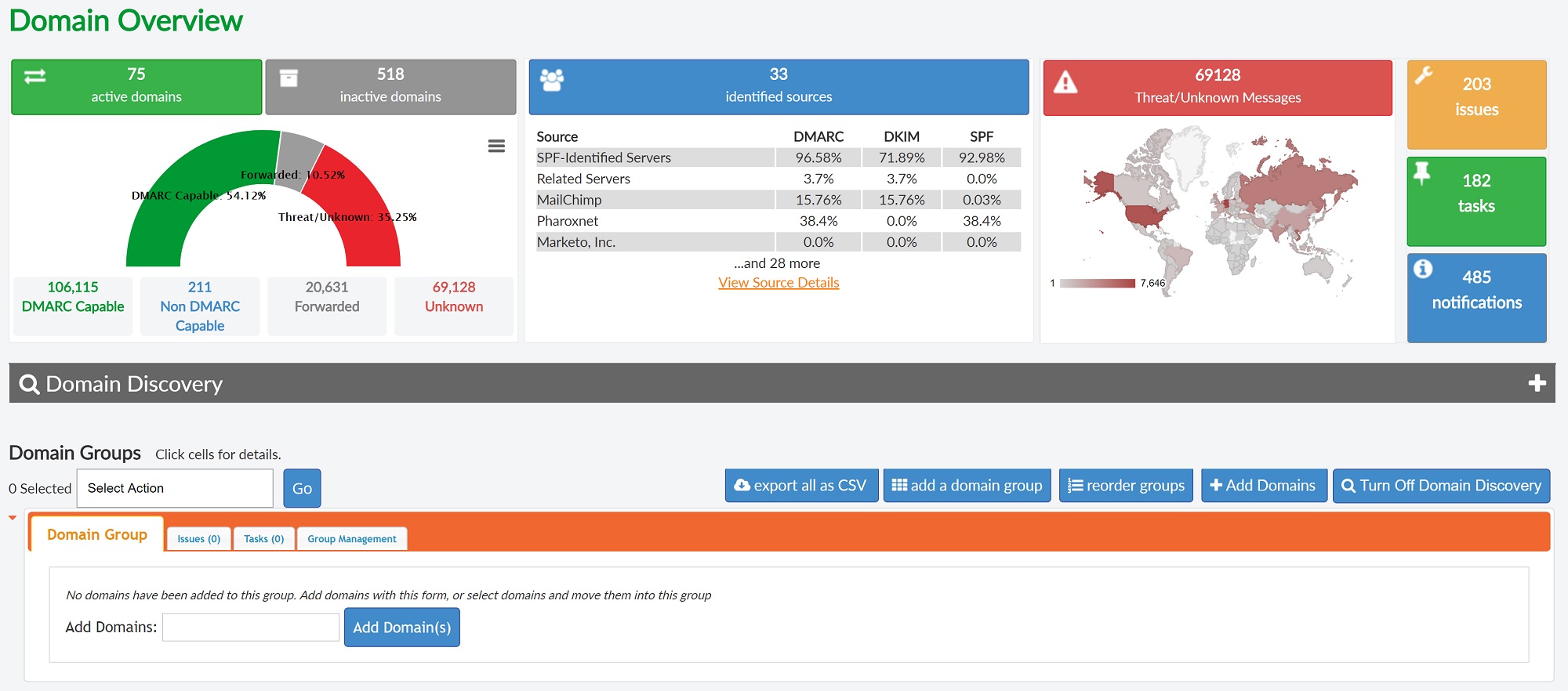
Apart from commercial solutions, there are also open source solutions available.
Useful documentation
- The website dmarc.org contains full syntax documentation and references to a lot of other documentation and information.
